Monday, December 17, 2012

Technology Current Event

Topic: Three dogs learned how to drive.

Article Title:

Dogs That Can Drive A Car? You Better Believe It!

Article Source: dogonews

Summary: Three New Zealand dogs learned how to drive a car. The dogs used were abandoned starys residing at New Zealand's SPCA. The driving classes were supervised by trainer Marke Vette. The training started with the dogs learning how to move the gears back and forth, turning the steering wheels, and applying the brakes. After the training was complete the dogs practiced using a motorized wooden go-kart. Finally, the dogs were ready to drive a real car.The car used were modified for the dogs to use. 


Description: Dog driving
Dare: Decemeber 10, 2012
Found at: dogonews


Reaction: These three dogs learning to drive is just so amazing. Who would have thought someday dogs could drive? I wonder how long it took the dogs to learn to drive? This proves just how smart dogs are. I'm not really into dogs; I have a huge fear of them. So maybe when they're in a car it'll be less scary.  


Description: Dog driving
Date: December 10, 2012
Found at: dogonews


World Impact: Dogs are used to help people in so many ways. Dogs that can drice can really come in handy. The handicaped and elderly can use the dogs to drive them around to different places. The only thing that might cause a problem is when the dog gets in a car accident. Who would be responsible for the crash? Along with learning to drive, the dogs might also need to learn the rules of the road.

Monday, November 19, 2012

Technology Current Event

Topic: Real-life Transfomers suits.


Article Title: Just In Time For Christmas - Real-Life Transformers Suits!


 Article Source: Dogonews


Summary: Drew Beaumier invented a real-life transformer suit. His suit contains of a vehicle body, helmet, battery belt and even motor equipped drive boots, that allows the user to zoom around like an automobile at speeds of up to 10-15km/hr when in“vehicle” mode. When a person is driving around in "vehicle" mode they can later spring up and strut around like Optimus Prime.


Description: Life-size transformer suit
Date:November 18, 2012
Found at: dogonews.com


 Since Drew custom-builds each suit from gently used toys and sporting gear, the drive suit can be made to resemble almost any vehicle. The suit takes about 50 hrs to create and cost about $1,800 USD each. Recently, Drew received an investment from Shark Tank's Kevin O'Leary (Mr. Wonderful) who plans to set him up with a toy manufacturer. By next Christmas toy stores all over the world will be featuring Drew's amazing invention.


 Reaction: This new invention is really cool and crafty. Everybody would want to buy something like that. It also came out right in time for Christmas. I think the transformer suit would make a cool halloween costume also. The price is a little too expensive though. People might not want to buy something so expensive. 


World Impact: I don't think this really impacts the world much. Other inventors may try to copy this invention or create something similar to it. I don't see this invention going world wide untill later on in the future. Like I said before the costume is really expensive. People in other countires might not be able to afford the invention untill later on when the price is more reasonable. 

Friday, November 16, 2012

Week Thirteen of GECHS

This week was really simple and easy. We went over our new digital literacy lesson and worked on a few other things. Unfortunately, we didn't learn about any new web 2.0 tool.


Our new digital literacy component this week was scams and schemes. We had a class discussion on how important it is to keep private information private. If your information gets out into the public, it can lead to multiple problems that may take years to fix. One major issue in the United States is identity theft. The only way someone can steal your identity is if you give them the information they need.

Description: Thief
Date: January 25, 2007
Found at: flickrcc.net

However, they are also ways you can avoid identity theft. Here are five rules to follow to protect you from online scams: 
  1. Avoid opening the message or email.
  2. Don't click on any links or download any attachments; they might contain viruses or spyware.
  3. Don't reply to the message.
  4. Mark as "junk mail" or "spam" for your email provider, or report it to your social networking site.
  5. If you are concerned about an account you have with a company, contact its customer service department by phone. Make sure you verify the company’s contact information elsewhere online first.


To guide us through our lesson we were given a list of words to define. We have already went over a few of the words in the past.

Scam- An attempt to trick someone, usually with the intention of stealing money or private information. 
Identity Theft- A type of crime in which your private information is stolen and used for criminal activity.
Vulnerable- In a position that makes it easier for you to be harmed or attacked. 
Phishing- When people send you phony emails, social media messages, texts, calls, or links to fake websites in order to hook you into giving out your personal and financial information.


Overall, this week was really laid back. I enjoyed not having that much work to complete. The only thing I had a problem with was my stems test.

Wednesday, November 7, 2012

Week Eleven of GECHS

This week was by far the best week ever here at GECHS. The moment we have all been waiting for has finally happened. The new building was ready for us! It was supposed to be completed a while back but all the waiting has finally paid off. Our first full day in the new building was on November 2, 2012. It was very exciting for all of us.


This week we signed up for a website called Noredink. Noredink is a simple site that both teachers and students can use. The site helps students practice and master grammar and writing skills in a fun and easy way. Noredink is also a way for us to study for grammar test. I really enjoy using it.


Our first assignment, as usual, was to edit our peers' blog. After having our blog edited, we went back and did a little revision and fixed our blog. Later, we commented on our classmates blogs. Having someone comment on our blog allows us to take in any suggestions and fix mistakes so our blog could be amazing.


The next day we started a new discussion on online tracking and targeting. Most of what we learned was about how companies can track your online activity and target specific ads and searches based on your demographic information and digital history. This may seem as an invasion of privacy but it doesn't all have to be negative. There are both negative and positive perspectives to it.


Description: Targeting
Date:April 23, 2008
Found at: Flickrcc.net


Online tracking and targeting can easily be something positive instead of negative. For example, you are looking for a movie to watch on Netflix. Instead of searching for a long time, netflix tries to determine the type of movies you enjoy based on your choices. Then they recommend movies that you may enjoy. Doing this is less time consuming and helps you search for movies easier.


The negative side of online tracking and targeting is that some information is hidden from you due to companies and search engines trying to tailor your online experience. This means that when two different people search the same thing, the results are not necessarily going to be the same. Having information personalized for you at all times doesn't always turn out to be a good thing.


Description:
Date:
Found at: www.flickrcc.net


We were also given a list of new vocabulary words to define.

Track- When companies collect information about you based on your online behavior.
Target- When companies tailor content to you based on the information they have collected about you.
Demographic- Common categories of the population, such as age, gender, and race.
Cookies- Data files that are stored on your computer when you visit certain sites.


There are multiple ways to stop companies from collecting too much of your information. This brings me to my next topic. Our new web 2.0 tool we used this week was Mixbook. Mixbook is a website that allows you to create a variety of things. Mostly photobooks, photocards, scrapbooks, yearbooks, and calenders.


The instructions given to us was to create a brochure giving 7 tips on how to limit data collection. Using mixbook, was a a little bit of a challenge. After a while it was easy to use. There wasn't really any negative aspects of Mixbook. It was a fun and easy website to use. My Mixbook is shown below.


Mixbook - Create Beautiful Photo Books and Scrapbooks! | Start your own Photo Books | Create custom Christmas Cards


Overall, this week was absolutely amazing! I really enjoyed everything we went over in class. I never knew that companies kept track of what you do online and try to tailor your online experience. Moving into our new building was just the icing on top of the cake! I can't wait until next week. It'll be our first full week in the new building.

Technology Current Event

 Topic: Employees experience cyberbullying


Article Title: Cyberbullying Not Just a Problem for Kids


Article Source: Technewsdaily


 Summary: A study by researchers at British universities Nottingham University and the University of Sheffield  found that cyberbullying in the workplace can be worst for its victims. The cyberbullies use modern communications technology such as emails, texts or Web postings to abuse people. Victims of these attacks seem to suffer more than regular forms of bullying. Cases like these appear to be worse because "those that had experienced cyberbullying tended to have higher mental strain and lower job satisfaction"


Reaction: I was surprised that cyberbullying was also occurring at workplaces. I just thought it caused an issue in kids and teens. I expect that grown ups should be way more mature and grown up. What I still don't understand is how employees "suffer" more that the regular forms of bullying. My parents always tell me to have self-esteem for myself and not let anyone bring me down. Why can't adults have that same type of attitude? There are stories of suicides due to cyberbullying attacks. I have never heard of an adult committing suicide over it. So how do they get it worse?


 World Impact: I don't think this would  really impact the world. It is an eye-opener to me to see this happening. Maybe it would be for other people also. I guess bosses can see that what they say to their employees is considered cyberbullying. Know one wants to be known as the bully, I wouldn't.


Wednesday, October 31, 2012

Weekly Technology Current Event

Topic: You should lie online so your identity can be protected


 Article Title: Lie Online to Protect Your Identity, British Official Says


Article Source: Technewsdaily


Summary: What this article was basically stating was that people should lie online so their identity could be protected. Information such as your name and date birth should be fake when you are using a social networking site. Putting real information about you can be later used against you. However, this doesn't apply to government websites. You should always be honest about your self when you are using a government website. There was a controversy that rose on this topic. Facebook has a strict rule against using false identity's.


Reaction: Well, we are actually learned about this topic in one of my classes. My opinion on this topic is that you should be real online about who you are. However, I also agree that you should be careful what information you put online. In other words, don't be too real online. Private information such as your address, bank number, or your full name should be kept private.


 World Impact: This article should be read by everybody around the world. Keeping yourself safe online is really important. Situations like identity theft can happen anywhere. People can now get a wake up call. You never know who could see and read your information. There are actual stalkers out there. People need to understand that you need to understand that what you do online will catch up to you somehow. 

Friday, October 26, 2012

Week Ten of ECHS

This week has been one of the best weeks here at Early College. Most of the work we completed this week was simple, easy, and fun. We started a new discussion on being real online. We also completed another Digital Driver's License lesson. The new web 2.0 tool we used was Glogster.


The first thing we worked on was our current events and a new Digital Driver's License lesson. The lesson we completed was on digital communications, etiquette, and security.  There are so many different ways to communicate with each other digitally now.


Something you have to be careful about is staying secure online. There are various ways that people can hack your computer and get personal/financial information. When you get emails take time to analyze them and make sure it's not a phishing scam. Giving out personal information can lead to identity theft.


There are two forms of writing that we use when we communicate with each other, formal and informal writing. Usually we use informal writing when we talk to friends via text message. Formal writing is mainly used when we're doing academic writing or business communications. Believe or not when you use informal writing too much it can affect the way you do formal writing.


Whenever you use digital communication you have to show some etiquette to those around you. Having loud ring tones can sometimes annoy or bother people. Also, when you are talking to someone on a cellular device be aware of those around you. Don't yell or speak loudly. When your phone rings you can leave the room and go speak outside so you won't disturb those around you. Here's a Youtube video showing a few ways people use bad etiquette.


The next day we watched the movie 'Cyberbully'.  'Cyberbully' is a story about a teenager who becomes the victim of a cyberbully attack on a social networking site. She is betrayed by her best friend and also attempts suicide. Later on in the movie, her mom takes on the school system and state legislation to help prevent others from going through the same harrowing ordeal as her daughter.


Watching 'Cyberbully' helped us fully understand how serious cyberbullying is. The movie had a very emotional toll on us, but we were also very touched by the unbelievable story. It also gave us a glimpse of how bad cyberbullying can get from the victims point of view. I would recommend this movie for any teenager in high school.


Our class discussion this week was on how we present ourselves online. To guide us through this discussion we were given a few new terms to define.


Represent- How you show yourself to others.
Persona- The image or personality you portray to others.
Avatar- An image or graphic that represents you online.
Anonymous- A hidden identity.
Inhibited- Being careful or restrained about your actions or impulse.


Most people have a different persona online than they do in the outside world. It's okay to be yourself online. Lies that you say online can and will eventually catch up to you. How you portray yourself online can affect your future in many ways.


During our class discussion we went over different tips on how to stay real online. Later, we made a Glogster  giving advice on how to stay real online. Glogster is a really simple and easy website to use. I really loved it. The only problem is that it doesn't save your work automatically for you. The Glog I created is below.


This week has been one of the best weeks ever. I really enjoyed making a glog and discussing the different ways to stay real online. I can't wait until next week to see what else we would be learning. 

Monday, October 22, 2012

Weekly Technology Current Event

Topic: Some British scientists discovered a way to create gasoline from thin air and water.


Article: Title: British Scientists Create Gasoline From Thin Air (And Water)!


Article Source: www.dogonews.com


Summary: Engineers at U.K. based Air Fuel Synthesis (AFS) created a fuel made from just air and water. The team of scientist start by extracting carbon dioxide from the atmosphere and hydrogen from water. . Both of the gasses are then combined in a reactor.


Afterwards, with the help of a catalyst, the hydrocarbon mixture is converted into methanol, which is later transformed into usable fuel using a procedure known as the MOBIL methanol-to-gasoline reaction.


In the last three months the engineers have only created a total of 5 liters (1.32 gallons) of the synthetic gasoline. AFS is planning a commercial refinery that will be ready for larger scale fuel production by 2015. The gas made will not be sold to stations around the country, but instead reserved fir race cars and other vehicles that require special fuel.


Reaction: I think this invention is really cool. It could save a lot of money and time. The price for gas is slowly rising, but with this invention gas could become an easy resource to maintain and would be at a cheaper price.


This is truly an unbelievable invention. People can come up with so many different things now a days. This is a whole new era of creative thinking.


World Impact: This could impact the world greatly! There is an advantage of using up harmful carbon dioxide from the atmosphere.The synthetic fuel is also better for the environment because it uses the exact raw materials that are needed to make methanol and does not create harmful byproducts that result when fossil fuels are burnt.


The raw materials are also abundantly given. This could help make Earth a better planet. Using this method of creating gasoline, would help us preserve our natural resources.

Thursday, October 18, 2012

Week Eight & Nine of GECHS

We've accomplished quite a few things these past two weeks. I enjoyed learning new information about cyberbullying. Now I know how dangerous cyberbullying is. We also learned how to use a really cool web 2.0 tool called Wevideo.


The first thing we worked on was our peer editing tasks. This time we only choose two of the tasks, which was much more simple to complete. Our teacher wanted us to experience how much hard work a teacher is required to do just to edit one students work.


Description: Stop bullying
Date: February 29, 2012
Found at: www.flickr.com 
Our new digital literacy component this week was cyberbullying. Sometimes people see cyberbullying as something not that serious, but it is.


 Words can hurt someone way more than you think. So choose your words carefully, it can save lives. Stand up for what's right.


To accompany our lesson unit on cyberbullying, we received some new definitions.

Target- The victim of a bullying attack.
Offender- Someone that wants to cause harm to a person
Bystander- A witness that just stands by and does nothing.
Up-stander- A witness that reacts and does something.
Escalate- When something intensifies or increases.
De-escalate- Something that decreases.


The new web 2.0 tool we used was Wevideo. Wevideo is a complex website that allows you to edit and create movies/videos.


When I first started using it, I hated it. I didn't like how it was way more complicated than it needed to be. Once I played around the site a little bit I got the hang of things and it became much more easier.


We used Wevideo to create a public service announcement on cyberbullying. On our video we had to persuade and encourage others to be up-standers instead of bystanders. We also included ways people can de-escalate a bullying situation. The video I created is shown below.


After all our videos were completed, we got the opportunity to watch all of our peers videos. It was really fun and cool to watch what everyone else created. Our teacher notified us that she would be posting all our videos on a site for the world to see.


The past two weeks seemed a little crazy but also interesting. What I liked most about this week was our unit on cyberbullying and creating a Wevideo. Using Wevideo was a fun and challenging experience for me, I really enjoyed it. I can't wait to see what we'll be learning about next week!

Wednesday, October 10, 2012

Wednesday Technology Current Event

1. Topic: Private information about you could be found online.


2. Article Title: 'Psychic' Gets Your Private Info From Internet


3. Article Source: technewsdaily.com


4. Summary: Some volunteers for an experiment in Brussels, Belgium are brought into a white tent to see a 'psychic'. Inside the 'psychic' tells them things that no ordinary stranger should know. Information like their address, romantic situation, children's names, medical history, how much they're selling their house for, shopping habits, and bank balance. When the volunteers hear this they are shocked and surprised.


The 'psychic' then reveals his trick. A curtain is pulled down, and behind it is a group of researchers on computers looking up personal information and telling the 'psychic everything they find through a hidden earpiece. After everything is revealed a television screen displays the words: "Your entire life is online. And it might be used against you. Be vigilant."


5. Reaction: My first reaction was, wow! Reading this section was like a reality check. People post way too much information about themselves online. This guy was just a stranger, but knew so much private information about a person just by the research online. This would definitely change the way I post things online.


6. World Impact: This experiment can change the way people post things online. Some people post so much private information online without even thinking about it. Now that people have proof of what strangers can find online, they might actually think before posting information.


Most of the participants in the experiment were shocked when they discovered the psychic's "trick". Which was just a simple research from typing in the person's name. Any stranger can do that, right?


This could also help keep people safe. For example, bank information that is posted for anyone to see can lead to identity theft. To keep this from happening, people can just simply be careful of what they share online.


Friday, October 5, 2012

Week Seven of GECHS

This week has been great! The construction on our building is moving along quickly. We should be in our brand new building in a just a few weeks. I am so excited! In our new building we'll finally get to have some freedom that we were not given during plan B.


We started this week off with a few new changes in our peer editing. We were given 6 trait writing informative peer editing tasks. The tasks were more in debt than what we were told to do before. They were also more difficult and time consuming.


 There is a possibility Monday's would be changed to peer editing days. The new way of editing allows us to catch mistakes on our partners blog so they would be able to change it and transform their blog to something truly amazing.


The topic we discussed the next day was "sexting".   Sexting is a very popular topic amongst teens. Sexting can ruin a person's reputation. At  the moment it might seem okay, but later the consequences would follow. We were also given a few words to define.


Self-disclosure- Sharing private, sensitive, or confidential information about yourself to others.
Reciprocate- To give in return.
Sexting- Sending or receiving sexually explicit photos or videos by text message or other digital devices.


We also completed another Digital Driver's License   lesson. This time we completed the section on health & wellness. The section completed covered more on sexting. It also discussed how too much use of the internet or other electronic devices can jeopardize our health.  At the end of the section , as always, there was a quiz to complete. I really enjoyed the lessons we looked over.


 Our new web 2.0 tool was Makebeliefscomix. On the website we created two comics related to our class discussion. In our class discussion on sexting we mentioned a few ways to avoid sexting and a few ways on how to build a relationship online. This information was put into our comic that we created. The comic that I created is shown below.


Over all this week has been great! I have learned a lot of new and useful information. Talking about the dangers of sexting could really come in handy if I ever get put in that situation. Making a comic was really cool and fun. The only problem was that it was hard trying to make it funny like a real comic. The website we used to make the comics was really simple to use. I hope to use the information I have learned some time. I can't wait to see what information I'll be learning next week.

Friday, September 28, 2012

Week Six of GECHS

This week has not been that great for me. As you can tell, this is the week of report cards. I have been falling behind on work, and it's frustrating. This class has been packed with tons of challenging work. The pace is also very fast, but I have learned a couple of interesting new things.


Our new digital literacy of this week was website evaluation.We were introduced to an online program called IRIS. On the website we went through a website evaluation section and took notes. After a class discussion on evaluating websites, we were given an example of a website to evaluate. There are six simple steps in evaluating a website, which we know as A.S.P.E.C.T. Each letter stands for a different step.


A. (Authority)- Look for who the author is.
S.(Sources)- Look for any sources to see where the author got their information.
P.(purpose)- Figure out why the website was created.
E.(Evenness)- Check if both sides have equal coverage.
C.(Coverage)- Compare information on the site to other resources.
T.(Timeliness)- Make sure the information is updated.


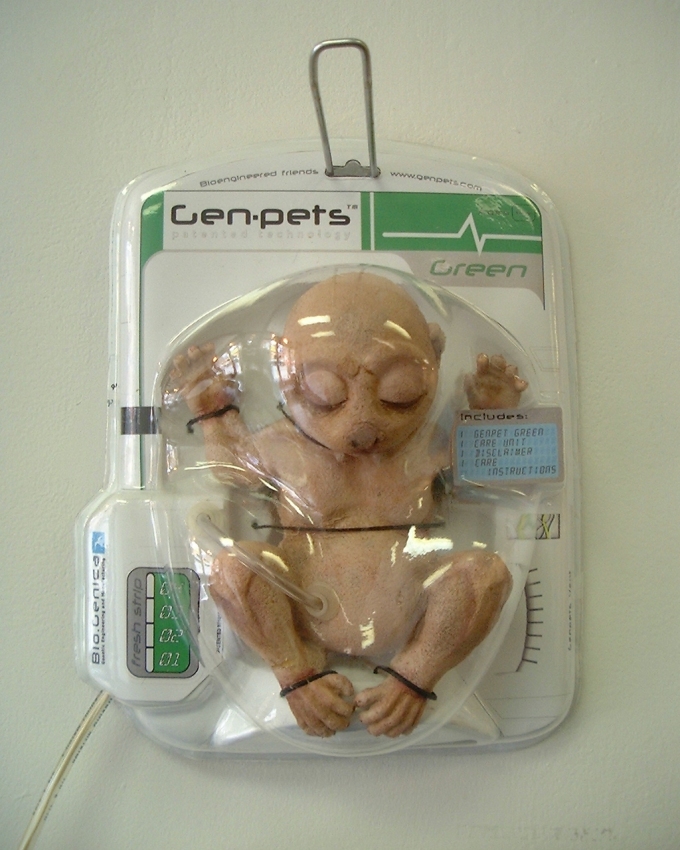
The website we evaluated was http://www.genpets.com. The website seemed very realistic. Many of my classmates, including myself, were deceived by certain contents of the site. Some even said they wanted a genpet of their own. After a full evaluation we discovered the website was fake. Evaluating a website source is very important because anyone can put anything online. How do you know if its true or not?


Description Bio-genica Genpets 
Available at: http://www.genpets.com/media/photo06.jpg


This week we also worked on another Digital Driver's License lesson. The section we completed was, Digital Fluency. On the website we went through various lessons about Digital Fluency. We were given a couple websites to evaluate. Some of the websites looked legitimate, but instead was a hoax. At the end of the lessons, there was a quiz.


Description: Digital driver's License
Available at: http://otis.coe.uky.edu/DDL/launch.php 


Another nifty tool we were introduced to was mindmeister. Mindmeister is kind of like a graphic organizer. It allows you to put different sorts of information on a concept map. The information included in your map lead back to one specific topic. I really enjoyed creating a mindmeister of my own on website evaluation. My wonderful creation is shown below.


<
Create your own mind maps at MindMeister


Overall, this week was okay. I have learned an abundant amount of information that would come handy in the future. Before I use a website for a project, I can now fully evaluate it. Another thing that can come in handy sometime is mindmeister. I can use this website to help organize all kinds of information. I'm introduced to a lot of new helpful tools and digital literacy every week. I'm looking forward to what else we learn next week.

Wednesday, September 26, 2012

Wednesday Technology Current Event


 Topic: Video games can now help the U.S military during a war.

     Article Title: How Video Statistics Can Transform War

     Article Source: technewsdaily.com


     Summary: Most of the U.S military's younger generation grew up playing video games that constantly tell players how well they're doing on the virtual battlefield. This type of technology can possibly become reality for soldiers. 


    Soldiers in the U.S could go into battle wearing "google glasses". Google glasses can warn them of exhaustion level's by changing their vision's tint from green to yellow or red. The glasses could also warn them of other information needed on the battlefield.


     The amount of energy and pride put into climbing the rankings of 'Call of Duty' multi-player could be transformed into higher soldier performance. This idea remains decades away from being acted upon even if the U.S commander's decide to support it.


    5. Reaction: My first reaction to this was,"wow"! Who thought playing video games could help train for military? There are a lot of people wanting to go into the military. Now they could just play video games like 'Call of Duty' to help them train in that field. This could also help U.S soldiers while on the battlefield. They can now know what kind of condition they're in during a battle. I think this is really cool.


    6. World Impact: This could be amazing! The U.S will have a great advantage over other countries in a war. Soldiers could be more aware of the condition they're in while on the battlefield. Now nurses and doctors could get to wounded soldiers earlier through this device. 


    This could be the beginning of new technology to help during wars. Other countries would also be attempting things like this to make their military stronger. I wonder what else would be coming out in the near future.    

    Friday, September 21, 2012

    Week Five of GECH

    Another week here at Gaston Early College has passed by. This week has been packed with multiple test and quizzes. Even through the difficulties, this week has been okay.


    This week, we started with a few new changes. We were assigned new peer editing partners. Our partners comment on our blogs and make suggestions that would make our blog magnificent. We were given  a new rubric on how we edit our blogs. This helps us become excellent bloggers.


    The following day we were introduced to a new program called Digital Driver's License. Digital Driver's License is a website that teaches valuable lessons about the online world and helps us become responsible online. After the lessons, the website had an assessment that we had to complete.


    Another effective tool we were introduced to was online photo editing. We had a class discussion on how captions on a picture can either make you or break you. For example, you post a picture of you drinking out of a cup and wearing a pirate hat. The caption is, "drunken pirate". Later on in the future you get denied a job because of that picture. The caption could've just said, "pirate". So basically be careful what type of captions you put on your pictures. Even if it is just a joke. The example used was in a worksheet we worked on called Private Today/Public Tomorrow.


    To put what we learned into use, we edited a picture of our own. I choose a picture from flickrCC and did a few editing. I used loonapix and pizap to edit my pictures. The instructions given was to take our chosen picture and edit a good and bad version of it. My picture is shown below.


    Image: Honey
    Date: June 8, 2008
    http://www.flickr.com/photos/nairoozdotcom/2564138034/

    Found on flickrcc.net


    Negative  version of original picture


    Positive  version of original picture


    Included with our lesson were a few definitions. The definitions we were given are shown below:

    Reputation- A general impression help by others and the public.
    Persist- To continue on and endure.
    Context- Different factors that surround information that helps determine its meaning.
    Tag- A caption that describes a photo or video. Could be words, terms, or a sentence.


    Personally, this week has been okay. One of the things I hated about this week was all the test and quizzes I took. I really enjoyed learning about photo editing and more on digital citizenship. I hope to use what I have learned later on in the future.


    Thursday, September 20, 2012

    Thursday Current Event

    1. Topic: A new device can help paralyzed patients walk on their own. 


    2. Article Title: " Bionic Suit Helps Paralyzed Patients Walk Independently"


    3. Article Source: Tech News Daily


    4. Summary: Ekso bionics created a bionic suit that can help paralyzed patients walk on their own. It braces the leg of people with spinal cord injuries. Whenever a patient uses their arms to push against metal crutches, a motor is activated in the bionic legs and allows them to stand and walk independently. The new bionic suit has been shipped to US rehab centers and is becoming popular among patients and doctors. 


    5. Reaction: I think this is an amazing invention! Paralyzed people can now be more independent and won't have to depend on people. People with disabilities are always looked down upon as someone that is weak. With the bionic suit, those who are unable to walk can show how they really are. I've learned that some people with disabilities hate it when people feel sorry for them or think they can't do anything on their own. 


      6. World Impact: This would make a huge impact on the world. People who are paralyzed and thought they would never walk again now have hope. Since this is the first invention, countries everywhere would attempt to create something similar to this. 


      This could be the beginning of an outbreak of inventions to help those who are handicapped. Maybe from now on handicapped people would not be looked down on as someone weaker. They could be more independent and won't need help from others.

        Friday, September 14, 2012

        Week Four of GECH

        Another week at GECHS has passed by, I personally think this week has been kind of laid back. The lessons we have discussed, over the course of this week, has been interesting, fun, and cool.


        We started this week off by completing our grammar notes and discussing how to break a sentence down. Each night for homework, we had a sentence that we had to break down into parts of speech, parts of a sentence, phrases, and clauses. It took me a while to understand the concept of it all. After a while of practicing and studying, I finally understood how easy it actually was.


        We also did a class discussion on online ethics and what it means to be a digital citizen. Ethics are the principals and morals that govern people's behavior. Online Ethics mean the same thing, but relates to internet and digital devices. Digital citizenship is a safe, responsible, and ethic approach to functioning in the digital world. 


        After our class discussion, we worked in partners on a worksheet related to the topic of digital citizenship. Afterwards, we did a discussion post on schoology. We were required to read other students post, and comment on what they thought digital citizenship meant.


        To help us get a better understanding of digital citizenship, we created a music video using animotoAnimoto is a free web 2.0 tool that creates music video's using pictures. I thought it was really cool, I had a lot of fun making one of my own. The only problem I had was finding pictures. I used flickercc to find pictures that were okay for me to use. We got the opportunity to view our classmates video's. I enjoyed watching other students creative work. My animoto is shown below, enjoy!


        Digital Citizenship on animoto


        On the day of 9/11 we took time out of class to watch a tribute video and remember the most tragic day in American history. My peers and I were only young children when 9/11 took place, but that day has changed all of our lives. Many lives were lost all because of a group of people that had hate for another culture that was not their own. Americans were not the only one's that got affected, people of different races were also highly impacted. Ever since 9/11 people of different races were looked on as "terrorist". They were judge only because of the way they looked. I want to pay my tribute to those lives that were lost by showing a tribute video below. Please watch the whole video, even after the credits.


        Thursday, September 13, 2012

        Thursday Technology Current Event

        Topic: Cyborg Cockroaches
          
        Article Title: Cyborg Cockroaches May Be Future Emergency Responders

        Article Source: Innovation News Daily


        Summary: Most people hate cockroaches and think they're gross, but is it possible that they may be future emergency responders? A video footage at North Carolina State University shows the part - robot roaches being led along a curving path with a remote control. There is a lightweight chip with a wireless receiver and transmitter attached onto Madagascar hissing cockroaches. On the insect's antennae and cerci, there is a wired microcontroller. Using electrical signals, researchers can direct the roaches to various locations. 


        Researchers hope that they could use biobotic roaches in place of robots since cockroaches are experts at performing in hostile environments. By creating a mobile web of smart sensors, researchers also wish to use the roaches to collect and transmit information. An example of a way the roaches could respond to emergencies is, finding survivors in a building that's been destroyed by an earthquake. Other researchers are are now also considering the possibility of technology enhanced roaches. 


        Reaction: My first reaction to this article was, " Ew! Roaches"?! I was surprised that researchers were even thinking of doing anything with roaches. After I read through the article, I thought of how helpful this could actually be. An example used in the article was the roaches finding survivors in a building that was destroyed by an earthquake. 


        If I was in a collapsed building and saw a roach, I'll try to shoo it away from me cause I'm scared of roaches and hate them. I wonder if researches actually thought of it that way. Overall, I think its a creative idea that could really be useful someday.


        World Impact: These biobotic roaches can really help in times of crisis. In cases like earthquakes, the roaches can transmit information like where a survivor is located. This can help rescuers find survivors faster and easier. This could really impact the world because, well, it can save lives! There are situations in the past where many emergency responders have lost their lives, or they couldn't get to survivors in time. With the roaches may be rescuers would be less likely to lose their lives and survivors can be found faster. 

        Friday, September 7, 2012

        Four day week!

        Having just a four day week was really exciting! The work this week was just a tad bit less than a regular week. We began this week with an introduction to Google Reader/RSS Feed. To help us get a better understanding of how to use Google Reader we watched a youtube video similar to the one below and worked on a very simple worksheet. The video I have posted is just the basics of Google Reader. There are a few crucial things that the video didn't really go into detail about. So I will give a brief explanation of the left out details.


                                                                            Link to Video


        You can subscribe to websites or blogs through Google Reader. An important tool of Google Reader is RSS Feed. RSS stands for Really Simple Syndication. It helps you keep up with favorite websites by updating articles automatically when needed. Whenever you want to subscribe to a website or blog, look for the RSS symbol. Below is a picture of what the RSS icon resembles. When you locate the symbol on the website or blog, you just simply click on it.


                                               Date: 2010-05-02


        If the RSS Feed symbol can not be found, do not be distressed. There is another way to subscribe when there is no RSS Feed. You can just copy the URL of what you  want to subscribe to. Afterwards, you go back to Google Reader and click the subscribe button. In the box that shows, you paste the URL that you have copied and hit subscribe. Want to know how to keep your subscriptions organized? Having folders based on the subject of your subscription is a good way to be organized. After you have read an article it is marked as read and does not show up again. We were required to subscribe to our classmates blogs and comment on a partners.


        Something cool we learned about this week is favicons. For those of you who don't know what a favicon is, it is the icon you see at the corner of your web-address bar when you visit a website. We created a favicon of our own blogs. It was fun seeing my classmates creative ideas for their favicon.


        In addition to being introduced to Google Reader/ RSS Feed we learned some basic rules on email etiquette. The class, as a whole, looked at a presentation and took a few notes. Basically we discussed over how crucial it is to be careful of what you do with emails and how you send them. Some of the notes I have taken are listed below.


        Basic Email Etiquette Rules:
        1. Do not use CAPS because they are considered yelling/shouting.
        2. Over punctuating is also considered yelling/shouting.
        3. Avoid emoticons.
        4. Explain Acronyms.
        5. Keep slang at a minimum.
        6. Check spelling and grammar before sending.
        7.  Text messaging abbreviations are confusing.  
          
        Things to think about before you send emails:
        1. Limit use of reply to all.
        2.  Is your email needed?
        3. Is your message complete and appropriate?


        A few ways to make your email exceptional:
        1. Format your message with bullets and paragraphs.
        2. Use keywords in subject line.
        3. Break your message into sections and don't over explain if the person you are sending to knows the details.
        4. Explain any attachment.
        5. If a topic is bounced back and fourth more than 3 times call the person or schedule a meeting.
        6.  If you are really mad about a topic wait 24 hours before you send the email.


        Don't let people violate your computer:
        1. There are people all over the world that participate in phishing. When you get emails that look official and ask for personal or financial information just delete it. When you click or respond to it and give the wrong person your information, they can use it for whatever they want.
        2. Spams are ads or scams that you get in your email. When you get a spam email just delete it! Replying or unsubsribing gives your address for more spam.
        3. A virus is the worst thing that could happen to a computer. Its an installed software that crashes your computer or monitors and control it. You only receive a virus when you click or or open a program. Virus's can be installed to your computer even without your knowledge.   


        Overall this week went well. I didn't even know what a favicon was until now.  Google Reader has helped me out on a lot of things. Now I can keep track of classmates blogs that I have subscribed to. I can also subscribe to different websites also. Learning email etiquette was also really interesting. Now I can properly send emails to teachers or other peers. There wasn't really anything negative about this week. Everything I was taught helped me in a very positive way.


        Thursday, September 6, 2012

        Robots Help US Millitary


        1. Topic: US Military Needing Extra Help From Robots

        2. Article Title: US Military Wants Humanoid Robots in the Drivers Seat

        3. Article Source: Artilce Source

        4. Summary: The US military wants robots that could help them directly in the battlefields. They need robots that can work even with loose supervision from humans. Boston Dynamics' four-legged robotic mule has caught the eye of the US Military. It has broken the record for land speed robots. They are in search for robots just like it. 

        5. Reaction: I think it a spectacular idea for US Military to use these robots. We would then have an advantage over other countries during a war. These robots are designed to do jobs that were meant for only humans. Some people say that some day robots would take over the world. I don't really believe that, but robots are the new topic.

        6. World Impact: This impacts the world because now during a war we have a great advantage over other countries. These robots can be a great helping hand to wounded soldiers. This can also cause a robot revelation. Other countries, once they have seen our robots, would race to make their own. The robots would be used to lessen the work of people everywhere.

        Monday, September 3, 2012

        Introduction to Publication Off To a Great Start!

        The past two weeks here at Gaston Early College have been a rough ride. The building that was being constructed for us is not yet completed. So us students are being walked around from class to class.

        Some students are aggravated by the way we are treated, but we know that's how it must be until we are in our building. All of the teachers so far have dedicated their time and effort into making sure we are comfortable during Plan B.

        This week we have started discussing copyright laws and how important they really are. Most of my peers don't take copyright seriously so I thought they weren't serious. Currently I have learned that copyright laws are not taking as serious as they really are. People can actually go to jail if the violate copyright laws.

        To show how crucial Copyright Laws are we made a Prezi presentation. This was my first time using Prezi and it was really confusing. At first I hated, but when I started getting used it I actually liked it. Its a really cool and unique way to do presentations.